반응형
ch05/cssstyle.html
<!DOCTYPE html>
<html lang="en">
<head>
    <meta charset="UTF-8">
    <meta name="viewport" content="width=device-width, initial-scale=1.0">
    <link rel="stylesheet" href="cssstyle.css">
    <style>.style-1 { color: olivedrab; }</style>
    <title>cssstyle.html</title>
</head>
<body>
    <h1>CSS를 적용하는 세 가지 방법</h1>
    <p>
        <b style="color: tomato;">인라인 스타일</b>
    </p>
    <p>
        <b class="style-1">내부 스타일 시트</b>
    </p>
    <p>
        <b class="style-2 style-3">링킹 스타일 시트1</b>
        <b class="style-2">링킹 스타일 시트2</b>
    </p>
</body>
</html>
ch05/cssstyle.css
/* 주석 */
.style-2 { color: slateblue; }
.style-3 { background-color: beige; }
CSS를 적용하는 세 가지 방법
인라인 스타일
내부 스타일 시트
링킹 스타일 시트1 링킹 스타일 시트2
<!DOCTYPE html>
<html lang="en">
<head>
    <meta charset="UTF-8">
    <meta name="viewport" content="width=device-width, initial-scale=1.0">
    <link rel="stylesheet" href="selector.css">
    <title>selector.html</title>
</head>
<body>
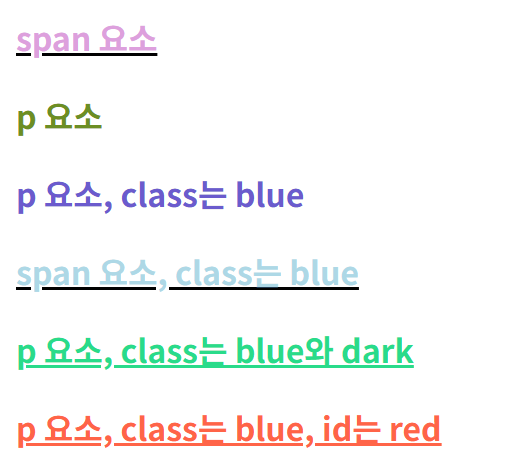
    <span>span 요소</span>
    <p>p 요소</p>
    <p class="blue">p 요소, class는 blue</p>
    <span class="blue">span 요소, class는 blue</span>
    <p class="blue dark">p 요소, class는 blue와 dark</p>
    <p class="blue" id="red">p 요소, class는 blue, id는 red</p>
</body>
</html>
/* selector.css */
* { font-weight: bold; color: darkorange; }

.blue { color: lightblue; }
/* p태그 이면서 blue 클래스를 가지고 있는 엘리먼트 선택 */
p.blue { color: slateblue; }
p { color: olivedrab; }
* { color: plum; }

p.blue.dark { color: rgb(40, 219, 138); }
.blue.dark { color: mediumblue; }

/* ID선택자는 우선순위가 굉장히 높다. !important에 가깝다. */
#red { color: tomato; }

/* 그룹선택자 */
span, .dark, #red { text-decoration: underline; }
span { text-decoration-color: black; }
mission01
위 화면의 결과를 보고 아래 html을 작성 후 css 내용을 작성하여 위 화면의 결과처럼 나올 수 있게 해주세요.
ch05/mission01.html
<!DOCTYPE html>
<html lang="en">
<head>
    <meta charset="UTF-8">
    <meta name="viewport" content="width=device-width, initial-scale=1.0">
    <link rel="stylesheet" href="mission01.css">
    <title>mission01.html</title>
</head>
<body>
    <button>gray 버튼</button>
    <button class="primary">blue 버튼</button>
    <button class="primary" id="submitBtn">green 버튼</button>
</body>
</html>
더보기
button { background: gray; }
.primary { background: blue; color: white; }
#submitBtn { background: green; }
mission02
일반 회원 #eee
주목 회원 #ffeb3b
VIP 회원 #f44336
안녕
<!DOCTYPE html>
<html lang="en">
<head>
    <meta charset="UTF-8">
    <meta name="viewport" content="width=device-width, initial-scale=1.0">
    <link rel="stylesheet" href="mission02.css">
    <title>mission2.html</title>
</head>
<body>
    <div class="card">일반 회원 #eee</div>
    <div class="card highlight">주목 회원 #ffeb3b</div>
    <div class="card highlight" id="vip">VIP 회원 #f44336</div>


    <div>안녕</div>
</body>
</html>
더보기
.card {
  background: #eee;
}

.card.highlight {
  background: #ffeb3b;
}


/* highlight + vip 조합이 ID보다 구체적이도록 작성 */
#vip {
  background: #f44336;
}
반응형